

What Is the Aruba ED Card Application?
The Aruba ED Card application is the online process through which every visitor to Aruba must register before traveling. The application is submitted through the official government portal at edcardaruba.aw, and it collects your personal information, travel details, and health declarations required for entry into Aruba.
Unlike traditional paper immigration forms, the Aruba ED Card application is completed entirely online before your trip. This digital system allows Aruba’s immigration authorities to pre-screen travelers, making the arrival process faster and more efficient. The application takes approximately 15-20 minutes to complete and requires a valid passport, travel itinerary, and accommodation details.
Every traveler visiting Aruba – regardless of nationality, age, or purpose of travel – must complete the Aruba ED Card application. This includes tourists, business travelers, and even infants. Each person requires their own individual application.
Step-by-Step Aruba ED Card Application Process
Follow these detailed steps to complete your Aruba ED Card application successfully:
Step 1: Access the official portal. Open your web browser and navigate to edcardaruba.aw. This is the only official government website for Aruba ED Card applications. Avoid third-party websites that charge additional processing fees.
Step 2: Create your account. Click the registration button and enter a valid email address. You will receive a verification email – click the link to activate your account. Use an email address you can access while traveling, as all confirmations and updates will be sent there.
Step 3: Start a new application. Once logged in, select “New Application” and choose your arrival method (air or sea). Most visitors arriving by commercial airline should select the air arrival option.
Step 4: Enter personal information. Fill in the following details exactly as they appear on your passport:
- Full legal name (first, middle, and last name)
- Date of birth
- Gender
- Nationality
- Passport number
- Passport expiration date
- Country of birth
Step 5: Provide travel details. Enter your flight information including airline name, flight number, and arrival date. If you have a return flight, include those details as well. Aruba immigration prefers to see round-trip travel arrangements.
Step 6: Add accommodation information. Enter the name and address of where you will be staying in Aruba. This can be a hotel, resort, vacation rental, or private residence. The address should be as complete as possible, including the street name and area.
Step 7: Complete the health declaration. Answer all health questions honestly. These questions cover recent illnesses, contact with infectious diseases, and current health status. False declarations can result in denial of entry.
Step 8: Review your application. Before submitting, carefully review every field. Pay special attention to your passport number and name spelling. Even small errors can cause processing delays or problems at immigration.
Step 9: Pay the application fee. The Aruba ED Card application fee is $20 per person. Payment is made by credit or debit card directly on the portal. For a complete breakdown of fees, visit our Aruba ED Card cost guide.
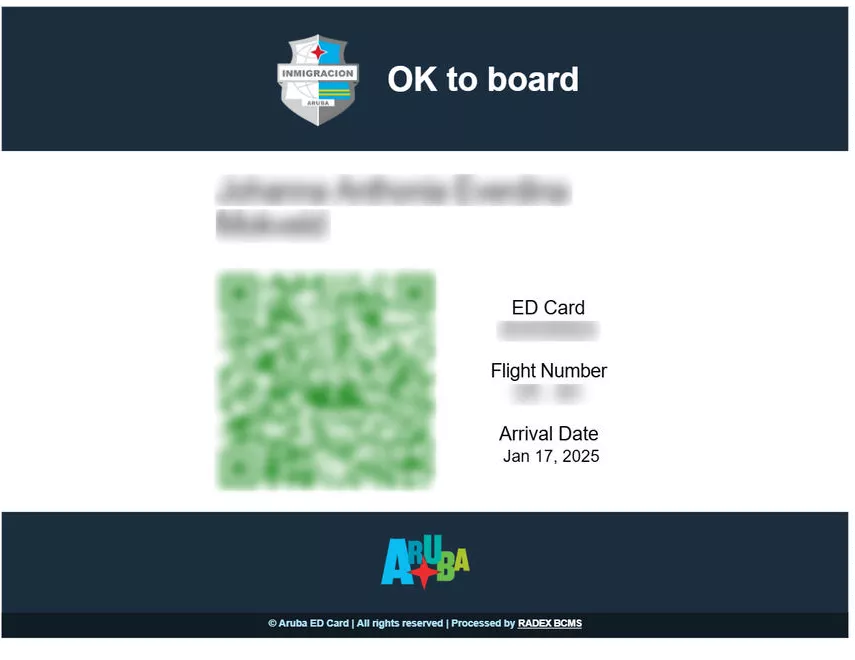
Step 10: Save your confirmation. After payment, you will receive an email with your ED Card confirmation and a QR code. Save this to your phone, email it to yourself, and print a physical copy as a backup.
Required Information for the Application
Before starting your Aruba ED Card application, gather the following information:
Personal documents:
- Valid passport (must be valid for at least 6 months beyond your Aruba departure date)
- Digital copy of your passport photo page (some applications require upload)
- Recent passport-style photograph
Travel information:
- Airline name and flight number
- Arrival and departure dates
- Return flight details (if available)
Accommodation details:
- Hotel or resort name and full address
- Booking confirmation number
- Contact phone number for your accommodation
Payment:
- Credit or debit card (Visa, Mastercard, or American Express)
- Card must have online payment capability enabled
For the complete list of required documents, see our Aruba ED Card requirements page.
Application Tips and Best Practices
Apply at least 72 hours before departure. While many applications are approved within 24 hours, allowing extra time prevents last-minute issues. During peak travel season (December through April), consider applying 1-2 weeks early.
Use a desktop or laptop computer. While the portal works on mobile devices, the application form is easier to complete on a larger screen. This reduces the chance of typos, especially when entering passport numbers.
Double-check passport details. The most common reason for application delays is mismatched passport information. Compare every field on your application against your physical passport before submitting.
Keep your login credentials safe. You may need to access your account later to check application status, download your ED Card, or update information. Save your username and password in a secure location.
Check your spam folder. Confirmation emails from edcardaruba.aw sometimes land in spam or junk folders. Add the sender to your contacts before applying to ensure delivery.
What Happens After You Submit
After submitting your Aruba ED Card application, the following process occurs:
Application review. Aruba immigration authorities review your application, cross-referencing the information with international databases. This automated and manual review process typically takes 24-72 hours.
Email notification. You will receive an email when your application status changes. Approved applications receive a confirmation email with a QR code attached.
QR code generation. Upon approval, the system generates a unique QR code linked to your application. This QR code contains your travel information and will be scanned at immigration upon arrival.
Airport verification. When checking in for your Aruba flight, airline staff will verify your ED Card status. Present your QR code (on your phone or printed) at the check-in counter and boarding gate.
Arrival in Aruba. At Queen Beatrix International Airport, immigration officers scan your QR code as part of the entry process. Keep your QR code accessible throughout your journey.
Common Application Problems and Solutions
Application rejected. If your application is rejected, review the rejection reason in your email. Common causes include incorrect passport information or incomplete health declarations. Correct the issues and resubmit.
No confirmation email received. Check your spam folder first. If the email is not there, log into your account on edcardaruba.aw and check the application status directly. You can download your QR code from your account if approved.
Payment declined. Ensure your card has online payments enabled and sufficient funds. Try a different card if the first attempt fails. International transaction fees may apply depending on your bank.
Wrong information submitted. If you notice an error after submission, contact the ED Card support team through the official portal. Minor corrections may be possible, but significant changes might require a new application.
Flight details changed. If your flight information changes after submitting your application, update your travel details through your account or contact support. Processing times may be affected by changes.
For information about processing timelines, visit our Aruba ED Card processing time guide. For the complete overview of the ED Card, see our Aruba ED Card complete guide.
FAQ
Can I apply for the Aruba ED Card on my phone?
Yes, the Aruba ED Card application portal works on mobile devices. However, using a desktop or laptop computer is recommended for easier form completion and fewer typing errors.
How long does the Aruba ED Card application take to complete?
The application form takes approximately 15-20 minutes to fill out. Processing and approval typically take 24-72 hours after submission.
Can someone else submit my ED Card application?
Yes, another person can submit the application on your behalf, such as a family member or travel agent. They will need all your personal and travel information, including passport details.
What if I make a mistake on my application?
If you notice an error before submission, simply correct it on the form. After submission, contact the ED Card support team through edcardaruba.aw to request corrections. Minor changes are usually possible.
Do I need to print my ED Card confirmation?
While not strictly required (the QR code on your phone works), printing a physical copy is recommended as a backup in case your phone battery dies or you lose internet access.
Can I apply for multiple family members at once?
Each traveler requires their own individual application, but you can submit multiple applications from the same account. You will need passport details and travel information for each family member.
What payment methods does the ED Card portal accept?
The official portal accepts Visa, Mastercard, and American Express credit and debit cards. Your card must have online payment capability enabled.
Is there a deadline for submitting the ED Card application?
There is no official deadline, but applications must be approved before your flight. Submit at least 72 hours before departure, and earlier during peak travel season.